

Outlook Desktop App Caching Disabled
What’s happening?
We are disabling caching of outlook items older than 1 month on all Shared PCs. This means that any machine that has multiple users, such as classroom PCs, Library PCs etc. will all have this applied to them. This will not affect your laptops or admin PCs that are for one specific person’s use.
When is it happening?
Friday 17th December, from 7am
What does this mean for me?
The vast majority of people won’t notice a difference after this change has been put into place. However, for those of you who use the Outlook Desktop App on shared computers you will notice that your emails will only show the last month’s worth of emails. Your emails are still there, they just won’t be downloaded by outlook.
If you still need to access older emails on a shared PC you can still do this in a couple of ways.
Use the Outlook Web App instead
You can always access all of your emails online by going to https://office.com and selecting the outlook icon from the left hand side. The web version of outlook doesn’t use caching to display your emails so isn’t affected by the change we are making here.
Continuing to use the Outlook Desktop App
When you scroll to the bottom of your inbox in the Outlook Desktop App you will notice a little message:
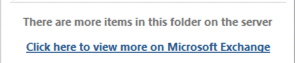
Clicking the blue link will load in more messages from online.
The technical bit
Doing this will help prevent issues on shared computers that we have recently started to face. Some of you have emails dating back many years, and when you log into a computer and open Outlook it downloads every last one of these emails to the computer’s hard drive. In some cases this takes up many gigabytes worth of space. The more people who use the computers, the more hard drive space is taken up by emails which eventually leads to the hard drive becoming completely full. Once this happens the computer will prevent anyone else from logging in, and in some cases other apps that you try to use will also break or crash.
